
With more journalists relying on virtual media interviews via Zoom, Microsoft Teams, FaceTime and other video platforms, it’s critical for brand spokespeople and executives to follow media training best practices before and during virtual broadcast interviews. Here’s everything you need to do for online media interviews to well represent your organization and clearly communicate key messaging.
Preparing For Your Interview
Virtual media interviews require the same level of prep as in-person conversations — sometimes even more. Controlling your environment and technology and practicing all contribute to a smooth, professional experience. Taking time to prepare your setup, refine your message and anticipate potential issues will help you feel confident and focused when it’s time to go live.
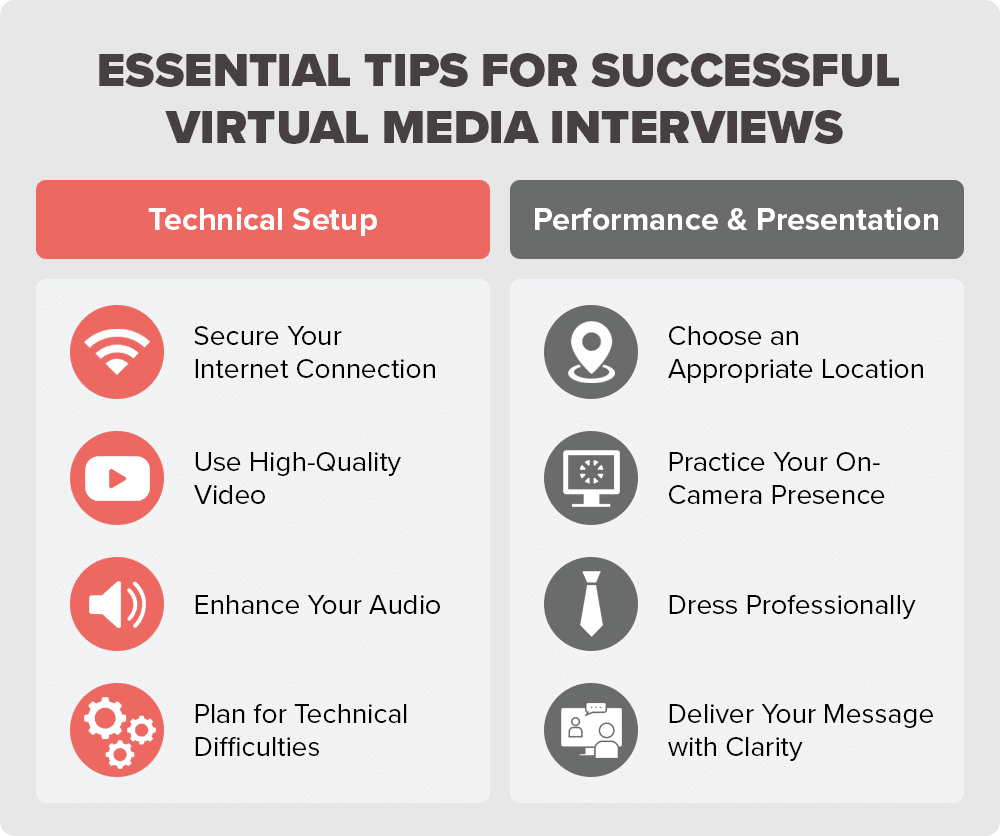
Secure Your Internet Connection
First, close any unused applications or programs that could interfere with your connection. Then, open an online video conferencing platform with a wired internet connection to increase stability and prevent signal loss. If a wired connection isn’t available, stay near your Wi-Fi router and pause high-bandwidth activities like streaming or large downloads. A stable connection reduces lag and prevents interruptions that can disrupt your video interview.
Use High-Quality Video
To best represent yourself and your brand, you want your video to be crisp and clear, not blurry or grainy. That’s why one of the best practices for online media interviews is to have a high-quality computer or phone camera. With a phone, use a tripod to stabilize and frame yourself on screen. And regardless of the device you’re using, a little natural light at the right angle can enhance the quality. Avoid overexposure and dim locations.
These PR challenges sound familiar?
Let's explore how strategic communication can move your business forward.
Schedule a ConsultationEnhance Your Audio
Clear, consistent audio is just as important as high-quality video with remote interviews for TV, radio or print. Use an external microphone or a wired headset rather than relying on your device’s built-in mic. This remote TV interview tip minimizes echo and background noise and helps you get your message across clearly. Close windows and doors, silence nearby devices and choose a distraction-free space.
Also test your audio levels ahead of time. Your voice should sound natural and balanced. Recording a short test clip can help you confirm both video and audio quality, allowing you to make quick adjustments before going live.
Plan for Technical Difficulties
Even if it’s not your first TV or media interview, the most prepared people can still experience technical hiccups. Before starting your remote broadcast interview, install software updates, disable pop-up notifications and restart your device. Also have a backup plan — like a phone number to reconnect with the reporter — just in case your video feed drops.
If a technical issue does happen, stay composed. Keep your key talking points visible to help you stay on message when technology fails. A quick apology and smooth recovery show professionalism and confidence under pressure.
Practice Your On-Camera Presence
Get comfortable using the specified video platform ahead of your remote broadcast interview. Record mock on-camera interviews — either by yourself or with media training professionals — in the space (or with the background) you plan to use for the real conversation.
Rehearse answers to common questions from media outlets, and record these sessions so you can review your speaking volume, eye contact and other body language. Have a colleague or communications partner provide feedback on your tone, pacing and clarity.
Then troubleshoot any mistakes people often make in media interviews, adjust your lighting and framing and refine your messaging so you feel confident, prepared and polished when the virtual interview with the news outlet starts.
During the Interview
On the day of the interview, your preparation pays off. When the camera is on, stay present, maintain your composure and focus on delivering your message clearly. Remember that the reporter is there to have a conversation, not an interrogation. By staying natural, making eye contact with the camera and speaking with confidence, you’ll build credibility and ensure your key points resonate with both the journalist and their audience.
Choose an Appropriate Location
Find a quiet, well-lit and clean space to film your online broadcast interview. Avoid any areas with clutter or movement in the background that could be distracting to you, the reporter or the end viewer. If you can’t secure an office or backdrop that fits these standards, a blurred or neutral virtual background in front of a plain wall works in a pinch. Just be sure your virtual background is high resolution, professional and relevant to your story and branding.
Dress Professionally
Unlike phone interviews, people can see you in virtual media interviews and make judgements, whether conscious or not, about your professionalism and credibility — partially based on how you look. Even if it’s not an online interview for television, journalists still see you in virtual radio and print interviews.
That’s why it’s important to consider the organization you are representing when choosing your attire. Distracting outfits can draw attention away from your message.
Instead, here’s what to wear on camera for an interview with the media: Solid colors, but not all white or black, which can create lighting challenges and contrast issues. Avoid busy or tight patterns, distracting jewelry that makes noise or catches light and overly bright clothing that might not translate well on camera or that doesn’t make sense for your brand style.
Deliver Your Message with Clarity
Thoughtful delivery gets your talking points across stronger and builds trust with journalists and viewers. Be genuine, relatable and conversational rather than overly scripted. Speak with intention, maintain steady pacing and use natural expressions. And for sensitive or challenging topics, show empathy and composure.
After the Interview
Your work doesn’t end when the call disconnects. Following up professionally and reviewing your performance helps strengthen relationships with your media contacts and prepares you for future interviews.
Send a Thank You Note
Within 24 hours, send a brief email thanking the journalist for their time and the opportunity. Keep it concise and professional — this simple gesture reinforces your professionalism and helps maintain a positive relationship with them.
Review Your Performance
Watch or listen to the published interview if possible. Note what went well and identify areas for improvement, such as pacing, clarity or body language. This self-review helps you refine your approach for next time.
Share the Coverage
Once the interview is published or aired, share it through your organization’s channels — website, social media, newsletters or internal communications. This amplifies your message and demonstrates your team’s thought leadership to stakeholders and audiences.
Partner with a PR Firm Offering On-Camera Interview Training
Virtual interviews are now a core part of media relations, and thoughtful preparation is what turns them into confident, credible moments for your organization. When spokespeople show up polished and prepared, reporters and audiences notice.
If your team wants to better prepare for remote broadcast interviews, Lukas Partners offers award-winning on-camera media training and PR services. Talk with our experts today!